Researchers frequently reach a stage in their analysis where they must examine the relationship between a binary variable and a continuous variable. Many students attempt Pearson correlation because it appears in most tutorials. SPSS then produces confusing results or incorrect interpretations. This problem wastes hours and leads to inaccurate conclusions in dissertations and assignments.
The correct statistical technique in this situation involves point biserial correlation SPSS. This method measures the association between a dichotomous variable (such as gender, treatment group, or pass/fail) and a continuous variable (such as test scores or income). Researchers who apply the correct procedure obtain clear statistical evidence and a correct interpretation.
This guide shows you exactly how to run point biserial correlation in SPSS, interpret the results using APA format, apply syntax, and avoid common errors that cause incorrect outputs. If you feel stuck with SPSS analysis, our experts provide professional support through our online SPSS help and SPSS data analysis services.
Why Many Researchers Struggle With Point Biserial Correlation
Students frequently face several obstacles when analyzing relationships between binary and continuous variables.
First, many datasets contain variables coded as 0 and 1. SPSS users often assume that Pearson correlation fits every situation. This mistake leads to misinterpretation because Pearson assumes two continuous variables.
Second, some researchers attempt nonparametric approaches without understanding the difference between point biserial correlation and rank biserial correlation.
Third, SPSS output may appear simple but interpretation in APA format causes confusion. Many students do not know how to explain the coefficient, significance level, or effect size correctly.
When these issues appear during dissertation work, the analysis section becomes extremely difficult to complete. Many students then seek assistance through dissertation statistics help or professional support for help with SPSS assignment.
What Point Biserial Correlation Measures
Point biserial correlation measures the strength and direction of association between:
- One binary variable
- One continuous variable
Examples include:
- Gender (male/female) vs exam score
- Treatment group (control/experimental) vs blood pressure
- Pass/fail vs study hours
The statistic produces a correlation coefficient (rpb) that ranges from -1 to +1.
Interpretation follows the same logic used in standard correlation analysis. Positive values indicate that higher values in the continuous variable associate with the group coded as 1. Negative values indicate the opposite relationship.
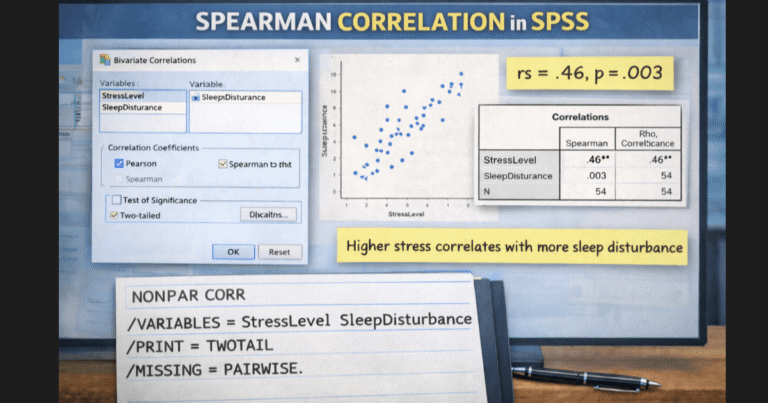
Researchers frequently combine correlation techniques in broader analyses. For example, some studies also involve Pearson correlation in SPSS or Spearman correlation SPSS when both variables contain ordinal or continuous data.
Data Requirements Before Running Point Biserial Correlation in SPSS
Many errors occur because researchers skip the assumption checks. A correct analysis requires the following conditions.
Binary Variable
The independent variable must contain exactly two categories coded numerically. Common coding includes:
- 0 = No
- 1 = Yes
or
- 1 = Male
- 2 = Female
Continuous Variable
The dependent variable must contain scale data such as scores, measurements, or continuous observations.
Independence of Observations
Each participant must belong to only one category.
Normality of the Continuous Variable
The continuous variable should follow approximate normal distribution. You can test this condition using procedures described in the normality test in SPSS guide.
If your data violate parametric assumptions, you may need nonparametric alternatives such as the method discussed in nonparametric correlation SPSS.
Students frequently ask our experts to verify assumptions before running correlations, which we handle through SPSS dissertation help.
How to Run Point Biserial Correlation in SPSS
SPSS does not display a menu labeled “point biserial correlation.” Instead, you run a Pearson correlation when one variable is dichotomous. SPSS automatically produces the correct statistic.
Follow these steps.
Step 1: Open the Correlation Menu
Select:
Analyze
Correlate
Bivariate
Step 2: Move Variables
Place the following variables in the analysis box:
- Binary variable
- Continuous variable
Step 3: Select Pearson
Ensure the Pearson option remains selected.
Step 4: Click OK
SPSS will produce the correlation matrix.
The output includes:
- Correlation coefficient
- Significance value
- Sample size
Researchers who perform large datasets often combine this process with descriptive statistics such as those explained in the descriptive analysis SPSS guide.
SPSS Syntax for Point Biserial Correlation
Researchers working with large datasets prefer syntax because it improves reproducibility.
The following syntax runs point biserial correlation.
CORRELATIONS
  /VARIABLES = gender exam_score
  /PRINT = TWOTAIL NOSIG
  /MISSING = PAIRWISE.
Replace the variable names with those in your dataset.
Syntax-based analysis helps researchers document their work, especially when preparing dissertations or journal manuscripts. Our team frequently assists students with SPSS scripts through SPSS lab support and advanced statistical consulting.
How to Interpret Point Biserial Correlation in APA
Many students complete the analysis but struggle with interpretation.
Suppose SPSS produces the following output:
r = .42
p = .003
n = 120
A correct APA interpretation would read:
A point biserial correlation examined the relationship between gender and exam scores. The analysis revealed a significant positive correlation, r(118) = .42, p = .003.
This result indicates that participants coded as 1 scored higher on average than those coded as 0.
Interpretation should always explain:
- The variables examined
- Direction of the relationship
- Statistical significance
Students often need help writing the statistical narrative in dissertations. For detailed assistance, many clients use our guide on how to write up a dissertation analysis using SPSS.
Rank Biserial Correlation SPSS
Some datasets violate normality assumptions or involve ordinal data. In such cases, researchers apply rank biserial correlation.
Rank biserial correlation measures the association between:
- A binary variable
- An ordinal or ranked variable
SPSS typically calculates this statistic indirectly through the Mann–Whitney U test.
Researchers interested in this nonparametric method can follow the procedure described in the Mann Whitney U in SPSS tutorial.
The rank biserial correlation derives from the U statistic and represents the effect size of the group difference.
Common Problems When Running Point Biserial Correlation in SPSS
Students frequently encounter several issues that produce incorrect results.
Incorrect Variable Coding
Binary variables sometimes contain values such as 1, 2, and 3. This structure breaks the assumption of dichotomous categories.
Always recode the variable so it contains exactly two values.
Treating Ordinal Data as Continuous
Some researchers analyze Likert scale responses as continuous variables without verifying scale construction. A proper approach often requires techniques discussed in the guide on how to analyze Likert scale data in SPSS.
Using the Wrong Correlation Method
Researchers often confuse Pearson, Spearman, and biserial correlations. Each method fits different data structures. Understanding the difference becomes critical in dissertation research or survey studies involving complex datasets.
Misinterpreting the Correlation Direction
The sign of the coefficient depends on how you coded the binary variable. If you reverse the coding, the correlation sign will also reverse.
Many students request professional review of their output to prevent interpretation mistakes. Our analysts regularly help with complex SPSS tasks through questionnaire data analysis services and full survey data analysis support.
When Researchers Need Expert SPSS Data Analysis Help
Statistical analysis often becomes the most difficult stage of research. Students spend weeks attempting to troubleshoot SPSS outputs, assumptions, and interpretations.
Common situations where researchers request professional assistance include:
- Dissertation or thesis statistical analysis
- Complex survey datasets
- SPSS output interpretation
- APA statistical reporting
- Troubleshooting correlation errors
Our analysts handle these challenges daily. Many clients begin with correlation analysis and later require advanced techniques such as multiple linear regression in SPSS, exploratory factor analysis SPSS, or reliability testing through Cronbach alpha in SPSS.
If your dataset produces confusing results or deadlines approach quickly, our specialists can run the analysis, interpret the output, and prepare publication-ready results. You can explore our full statistical consulting service through dissertation data analysis services.
Final Thoughts
Point biserial correlation provides a powerful method for examining relationships between a binary variable and a continuous variable. Researchers who apply the correct procedure in SPSS gain clear statistical evidence for their hypotheses.
This guide explained how to run point biserial correlation in SPSS, interpret the results using APA format, apply syntax, and handle rank biserial alternatives when assumptions fail.
Many students still struggle with coding variables, selecting the correct correlation method, and interpreting SPSS outputs correctly. Professional support eliminates these obstacles and ensures accurate statistical reporting in assignments, theses, and journal manuscripts.