Many dissertation students struggle when building surveys in Qualtrics. The platform is powerful, but beginners often find the setup process confusing. Small mistakes in survey structure, logic, question wording, or distribution settings can affect response quality and even invalidate research findings. That is why many students search for terms like “how to create a survey in Qualtrics,” “Qualtrics survey builder,” and “how to use Qualtrics survey software.”
If you are conducting thesis or dissertation research, learning how to properly create a Qualtrics survey is essential. A well-designed survey improves response accuracy, reduces participant confusion, and helps you collect reliable data for statistical analysis. Poor survey setup, on the other hand, can lead to biased results, missing responses, and major problems during analysis.
At myspsshelp.com, we help students worldwide create professional Qualtrics surveys for dissertations, thesis projects, healthcare research, psychology studies, business research, nursing studies, and PhD projects. Whether you need help with survey logic, Likert scales, consent forms, branching, scoring, or survey distribution, our team can help you build a research-ready Qualtrics survey.
You can also explore our dedicated Qualtrics survey design and setup services for expert assistance.
What Is Qualtrics?
Qualtrics is an advanced online survey platform widely used by universities, researchers, businesses, and organizations to collect data. Many institutions provide students with free access through university subscriptions.
The platform allows users to:
- Create professional surveys
- Add advanced question logic
- Randomize questions
- Collect online responses
- Export data to SPSS, Excel, CSV, and R
- Track completion rates
- Design mobile-friendly questionnaires
Researchers commonly use Qualtrics for:
- Dissertation research
- Thesis projects
- Healthcare studies
- Customer satisfaction surveys
- Employee feedback surveys
- Academic questionnaires
- Quantitative research
If you are planning statistical analysis after data collection, you may also benefit from our survey data analysis support services.
Qualtrics Create Account: How to Get Started
Before learning how to create a Qualtrics survey, you first need access to the platform.
Option 1: University Qualtrics Account
Most universities provide institutional Qualtrics access. Visit your university portal and search for “Qualtrics.” Your institution may provide a custom login page.
Option 2: Free Trial Account
You can create a trial account directly through the official Qualtrics website.
External Resource: Qualtrics Official Website
After creating your account:
- Log into Qualtrics
- Click “Create New Project”
- Select “Survey”
- Enter your project name
- Start building your questionnaire
How to Create a Survey in Qualtrics Step by Step
Step 1: Create a New Survey Project
After logging in:
- Click “Create New Project”
- Choose “Survey”
- Name your survey
- Select “Blank Survey Project”
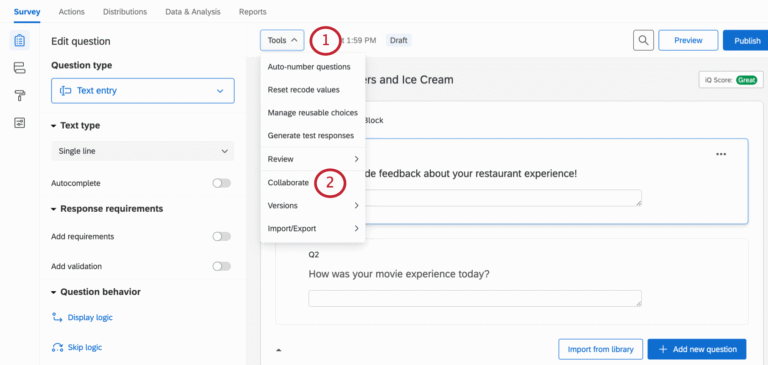
This opens the Qualtrics survey builder interface.
The survey builder allows you to add questions, organize blocks, apply logic, and customize the participant experience.
Step 2: Add Survey Questions
The next step is adding your research questions.
Common question types include:
- Multiple choice
- Matrix tables
- Likert scales
- Text entry
- Dropdown questions
- Ranking questions
- Slider scales
For dissertation research, Likert scale questions are extremely common.
Example:
| Statement | Strongly Disagree | Disagree | Neutral | Agree | Strongly Agree |
|---|---|---|---|---|---|
| Social media affects academic performance |
When designing research questions, ensure:
- Questions are clear
- Questions measure research objectives
- Wording avoids bias
- Response options are balanced
- Questions remain concise
Students struggling with questionnaire design can explore our professional survey design services.
Step 3: Organize Questions Using Blocks
Qualtrics organizes questions into “Blocks.”
Blocks help structure surveys into sections such as:
- Demographics
- Research variables
- Screening questions
- Consent forms
- Open-ended responses
A typical dissertation survey may include:
Block 1: Consent Form
Explains research purpose and participant rights.
Block 2: Demographics
Collects age, gender, education level, or location.
Block 3: Main Research Variables
Measures dependent and independent variables.
Block 4: Final Comments
Optional open-ended responses.
Organized surveys improve participant experience and reduce dropout rates.
Step 4: Use Survey Logic in Qualtrics
One major advantage of Qualtrics survey software is advanced survey logic.
You can apply:
- Display logic
- Skip logic
- Branch logic
- Embedded data
- Randomization
Example:
If participants answer “No” to employment status, employment-related questions can automatically disappear.
This improves survey quality and participant experience.
Many dissertation students make errors when setting up survey logic. Incorrect branching can produce incomplete or invalid datasets. If you need expert help, our online survey experts can assist.
Step 5: Customize Survey Design
Qualtrics allows you to customize:
- Fonts
- Colors
- Survey themes
- Mobile responsiveness
- Progress bars
- Question layout
A professional design increases participant trust and response completion rates.
Avoid:
- Excessive colors
- Long pages
- Confusing formatting
- Overloaded matrix tables
Clean survey design improves data quality significantly.
Step 6: Test Your Qualtrics Survey
Before distributing your questionnaire, always test it carefully.
Check:
- Question wording
- Logic flow
- Mobile compatibility
- Missing response options
- Typographical errors
- Required questions
- Completion time
Pilot testing is extremely important for dissertation surveys.
Many researchers conduct a pilot study before launching the final questionnaire.
You may also find our PhD survey guide useful for improving research quality.
Step 7: Distribute Your Survey
After testing your questionnaire:
- Click “Distributions”
- Generate survey link
- Share through:
- Facebook groups
- Research communities
- University mailing lists
You can also use anonymous links or personal links depending on research requirements.
Related Guide: How to Share Qualtrics Survey
Step 8: Export Qualtrics Data for Analysis
Once responses are collected:
- Click “Data & Analysis”
- Export data
- Choose format:
- SPSS
- Excel
- CSV
- R
Most dissertation students eventually analyze their data using SPSS or R.
Helpful resources:
Common Mistakes Students Make When Creating Qualtrics Surveys
Poor Question Wording
Leading or confusing questions reduce data reliability.
Too Many Questions
Long surveys increase participant dropout rates.
Incorrect Logic Settings
Broken branching logic creates incomplete datasets.
No Pilot Testing
Skipping pilot testing increases survey errors.
Weak Variable Measurement
Improper scales affect statistical analysis later.
Ignoring Mobile Users
Many participants complete surveys on phones. Poor mobile formatting lowers response quality.
How to Use Qualtrics Survey Software Effectively for Dissertation Research
To use Qualtrics effectively:
- Align questions with research objectives
- Use validated scales where possible
- Keep surveys concise
- Apply proper branching logic
- Test thoroughly before launch
- Use professional formatting
- Ensure ethical compliance
Dissertation supervisors often reject poorly designed questionnaires. Proper survey structure improves research credibility and helps during defense and publication.
External Resource: Qualtrics Support Center
Why Dissertation Students Choose Professional Qualtrics Survey Help
Many students lack time or technical experience to properly configure complex surveys.
Professional assistance helps with:
- Survey design
- Research question alignment
- Logic setup
- Consent forms
- Variable structuring
- Pilot testing
- Data export preparation
- Statistical readiness
At myspsshelp.com, we help dissertation students create research-ready Qualtrics surveys that align with academic standards.
Our services include:
- Full Qualtrics survey setup
- Survey logic configuration
- Dissertation questionnaire design
- SPSS-ready coding
- Data analysis support
- Reliability and validity guidance
Visit our survey design page for more details.
Get Expert Help Creating Your Qualtrics Survey
If you are struggling to create a dissertation survey in Qualtrics, professional help can save you time and prevent costly research mistakes.
At myspsshelp.com, we help students worldwide design professional academic surveys using Qualtrics. Whether you need a simple questionnaire or a complex branched survey with advanced logic, our experts can help you create a clean, research-ready survey that supports accurate statistical analysis.
Explore our specialized Qualtrics survey design and setup services today.
FAQs About Creating Surveys in Qualtrics
How do I create a survey in Qualtrics?
Log into Qualtrics, create a new project, add questions, organize blocks, apply logic, test the survey, and distribute the survey link to participants.
Is Qualtrics good for dissertation research?
Yes. Universities and researchers widely use Qualtrics because it supports advanced survey logic, secure data collection, and easy export to SPSS and R.
Can I export Qualtrics data to SPSS?
Yes. Qualtrics allows direct export to SPSS format, making statistical analysis easier for dissertation students.
What is the Qualtrics survey builder?
The Qualtrics survey builder is the interface used to create questionnaires, add logic, customize layouts, and manage survey flow.
How long should a dissertation survey be?
Most dissertation surveys should take between 8 and 15 minutes to complete. Longer surveys often reduce response rates.
Can someone help me create a Qualtrics survey?
Yes. At myspsshelp.com, we help students create professionally structured Qualtrics surveys for dissertations and research projects.
What are the best question types for dissertation surveys?
Likert scales, multiple choice questions, matrix tables, and demographic questions are commonly used in quantitative dissertation research.
How do I share a Qualtrics survey?
You can distribute surveys through email links, anonymous links, social media, university mailing lists, or embedded website links.
Why is my Qualtrics survey not collecting responses properly?
Common causes include broken logic, incorrect survey flow settings, inactive links, or poor mobile formatting.
Can Qualtrics randomize questions?
Yes. Qualtrics supports question randomization and block randomization to reduce bias in research studies.
Is Qualtrics free for students?
Many universities provide free Qualtrics access to enrolled students through institutional subscriptions.
Can Qualtrics surveys work on mobile phones?
Yes. Qualtrics surveys are mobile responsive, but you should always test formatting before launching your study.
What if I need help analyzing my Qualtrics survey data?
You can explore our dissertation statistics help and questionnaire data analysis services for expert assistance.