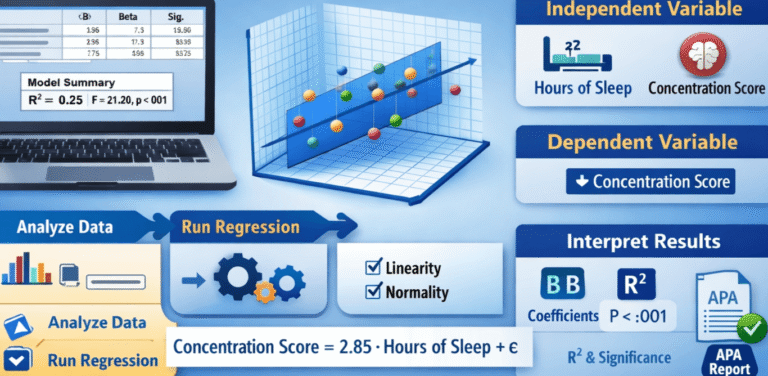
Trying to run linear regression in SPSS for your dissertation but unsure which variable goes in the Dependent box, what R Square means, whether your model is significant, or how to interpret the Coefficients table?
You are not alone.
Linear regression in SPSS looks simple until the output appears. Suddenly, you have a Model Summary table, ANOVA results, coefficients, Beta values, t statistics, significance values, residual plots, and assumptions to explain in your dissertation.
One wrong variable, an unchecked assumption, or an incorrect interpretation can affect your entire results chapter.
This guide explains how to run a linear regression in SPSS, check the main assumptions, interpret SPSS regression output, write the regression equation, and report the results for a dissertation or thesis.
If your deadline is close and you already have your dataset or SPSS output, you can also get professional SPSS regression help with analysis, interpretation, and dissertation results reporting.
How to Run Linear Regression in SPSS: Quick Steps
If your data is already prepared correctly, follow these steps to run linear regression analysis in SPSS:
- Open your dataset in SPSS.
- Click Analyze.
- Select Regression.
- Click Linear.
- Move your outcome variable into the Dependent box.
- Move your predictor variable or variables into the Independent(s) box.
- Keep Enter selected if you are running a standard linear regression.
- Click Statistics and select the statistics required for your analysis.
- Use Plots and Save where necessary to check regression assumptions.
- Click OK to run the model.
SPSS will generate regression output that may include the Model Summary, ANOVA table and Coefficients table.
Running the analysis is often the easiest part.
The real challenge is knowing whether the correct regression model was used and interpreting the output accurately.
Already staring at SPSS regression tables and unsure what they mean? MySPSSHelp.com provides online SPSS help for dissertation students who need regression analysis, assumption testing, output interpretation, and results reporting.
What Is Linear Regression in SPSS?
Linear regression is a statistical technique used to examine whether one or more independent variables predict a continuous dependent variable.
In simple terms, regression helps answer questions such as:
- Does study time predict examination performance?
- Does employee engagement predict job satisfaction?
- Does income predict consumer spending?
- Does age predict blood pressure?
- Does service quality predict customer satisfaction?
For example, a dissertation research question might ask:
Does employee engagement significantly predict job satisfaction?
In this case:
Independent variable: Employee engagement
Dependent variable: Job satisfaction
A linear regression model can test whether employee engagement significantly predicts job satisfaction and estimate the direction and magnitude of that relationship.
The basic simple linear regression equation is:
Y = b₀ + b₁X + ε
Where:
Y = dependent variable
b₀ = intercept or constant
b₁ = regression coefficient
X = independent variable
ε = error term
For multiple linear regression, more predictor variables are added to the model.
The challenge for many dissertation students is deciding whether linear regression is actually the correct statistical test.
If your dependent variable is binary, such as Yes/No, Disease/No Disease, Pass/Fail, ordinary linear regression may not be appropriate. You may need binary logistic regression in SPSS.
Choosing the wrong regression model can produce an analysis that does not answer your research question correctly.
When Should You Use Linear Regression in SPSS?
You should consider linear regression when your research question examines whether an independent variable or set of independent variables predicts a continuous outcome.
Linear regression may be appropriate when:
- Your dependent variable is continuous.
- You want to examine prediction or statistical association.
- Your variables meet the relevant regression assumptions.
- Your research question is compatible with a linear model.
- Your analysis plan requires simple or multiple linear regression.
For example:
Research question: To what extent does academic motivation predict student performance?
Dependent variable: Student performance score
Independent variable: Academic motivation score
A linear regression model may be appropriate.
However, statistical test selection should be based on your research question, variable measurement levels, research design, and data characteristics.
Do not choose regression simply because your supervisor mentioned the word “relationship.”
A correlation and regression answer related but different analytical questions.
If you are unsure which test matches your dissertation objectives, dissertation statistics help can help you select the correct analysis before running SPSS.
Simple Linear Regression vs Multiple Linear Regression in SPSS
Before running regression analysis in SPSS, determine whether you need simple or multiple linear regression.
Simple Linear Regression in SPSS
Simple linear regression has:
- One dependent variable
- One independent variable
For example:
Does advertising expenditure predict monthly sales?
Advertising expenditure is the predictor, while monthly sales is the outcome.
You can read the detailed simple linear regression SPSS guide if your model contains one predictor.
Multiple Linear Regression in SPSS
Multiple linear regression includes:
- One continuous dependent variable
- Two or more independent variables
For example:
Do study time, academic motivation, and class attendance significantly predict examination performance?
Here, examination performance is the dependent variable.
Study time, academic motivation, and class attendance are predictors.
Multiple regression allows you to estimate the contribution of each predictor while accounting for the other predictors in the model.
If your dissertation model contains several independent variables, review the multiple regression SPSS guide.
Before Running Regression in SPSS: Check Your Variables
A common SPSS regression mistake happens before the analysis even begins.
Students place the wrong variables in the wrong boxes.
Which Variable Goes in the Dependent Box in SPSS?
The variable you want to explain or predict goes into the Dependent box.
It may also be called the:
- Outcome variable
- Response variable
- Criterion variable
- Dependent variable
For example, if your hypothesis states:
H1: Customer satisfaction significantly predicts customer loyalty.
Customer loyalty is the dependent variable.
Which Variable Goes in the Independent(s) Box?
The variable used to predict the outcome goes into the Independent(s) box.
It may also be called the:
- Predictor
- Explanatory variable
- Independent variable
In the previous example, customer satisfaction is the independent variable.
If you reverse these variables, you run a different regression model.
This is one reason students can produce technically valid SPSS output that does not answer their dissertation hypothesis.
If your variables, hypotheses, and statistical tests are not aligned, consider getting help with SPSS analysis before writing your results chapter.
Linear Regression Assumptions in SPSS
Do not interpret a regression model without considering its assumptions.
A significant p-value does not automatically mean the analysis is valid.
The main assumptions and diagnostic considerations for linear regression include:
Linearity
Linear regression assumes a linear relationship between the predictors and the dependent variable.
In simple regression, a scatterplot can help assess whether the relationship appears approximately linear.
In regression diagnostics, residual plots are also important.
If the relationship is clearly nonlinear, a standard linear model may not describe the data appropriately.
Students specifically searching for how to test linearity in SPSS should not rely only on the final significance value in the Coefficients table.
Independence of Errors
Regression errors should be independent.
The Durbin-Watson statistic is commonly examined when independence of residuals is relevant to the analysis.
Interpretation should consider the research design and data structure rather than applying a single rule mechanically.
Homoscedasticity
Homoscedasticity means that the variance of the residuals should remain reasonably consistent across predicted values.
A residual scatterplot can help evaluate this assumption.
A clear pattern or changing spread in the residuals may suggest heteroscedasticity.
This issue matters because heteroscedasticity can affect statistical inference.
Read the detailed guide on why heteroscedasticity is a problem if your residual plot does not look right.
Normality of Residuals
The normality assumption concerns the model residuals.
Students frequently make the mistake of checking whether every raw variable is normally distributed and assuming regression cannot be performed if one variable is non-normal.
Regression diagnostics should focus on the assumptions relevant to the model.
Histograms and normal probability plots can help assess residual behaviour.
Multicollinearity
Multicollinearity is particularly important in multiple linear regression.
It occurs when predictor variables are strongly related to each other.
SPSS can provide Tolerance and Variance Inflation Factor (VIF) statistics to help assess multicollinearity.
Severe multicollinearity can make individual regression coefficients unstable and difficult to interpret.
Outliers and Influential Cases
Extreme or influential observations can substantially affect a regression model.
Depending on the analysis, diagnostics may include:
- Standardized residuals
- Studentized residuals
- Cook’s distance
- Leverage values
- Casewise diagnostics
Do not automatically delete an observation because SPSS identifies it as unusual.
First determine whether the value is a data entry error, a genuine observation, or an influential case that requires further investigation.
Failed a regression assumption and do not know what to do next?
Do not transform variables, remove cases, or switch statistical tests randomly.
MySPSSHelp.com provides SPSS data analysis help for students who need assumption testing, regression diagnostics, and a defensible analysis strategy.
How to Do Linear Regression in SPSS Step by Step
Once your variables and assumptions have been considered, you can run the regression model.
Step 1: Open Your Dataset in SPSS
Open the SPSS data file containing your dependent and independent variables.
Before running the analysis, check:
- Variable names
- Variable labels
- Value coding
- Missing values
- Measurement levels
- Data entry errors
Poor data preparation can affect your regression output.
If your dataset contains inconsistent coding or missing values, professional SPSS data entry and preparation help can help clean the file before analysis.
Step 2: Go to Analyze, Regression, Linear
From the SPSS menu, select:
Analyze → Regression → Linear
This opens the Linear Regression dialogue box.
IBM’s SPSS Statistics documentation describes the statistics available for linear regression, including regression coefficient estimates, standard errors, standardized coefficients, t values, significance levels, and confidence intervals.
Step 3: Add the Dependent Variable
Move your outcome variable into the Dependent box.
For example:
Dependent variable: Academic performance
Only one dependent variable is analysed in a standard linear regression model at a time.
Step 4: Add the Independent Variable or Variables
Move your predictor into the Independent(s) box.
For a simple linear regression:
Independent variable: Study time
For multiple linear regression, you may include several predictors.
For example:
- Study time
- Class attendance
- Academic motivation
The variables included should be based on your research model and hypotheses.
Step 5: Select the Regression Method
SPSS commonly displays Enter as the default method.
With the Enter method, the specified predictors are entered into the model together.
Other methods may appear, including stepwise procedures.
Do not select a regression method simply because it produces a higher R Square or more significant results.
Your method should be justified by the study design and analytical purpose.
Step 6: Select Regression Statistics
Click Statistics.
Depending on your research requirements, you may select:
- Estimates
- Model fit
- Confidence intervals
- Descriptives
- Part and partial correlations
- Collinearity diagnostics
- Durbin-Watson
Click Continue.
The exact statistics required depend on the model and dissertation reporting requirements.
Step 7: Create Regression Plots
Click Plots where diagnostic plots are required.
A common residual plot places:
ZPRED on the X-axis
and
ZRESID on the Y-axis.
This plot can help assess the residual pattern and variance.
Additional diagnostic plots may be required depending on your model.
Step 8: Save Regression Diagnostics if Required
The Save option can generate diagnostic variables.
Depending on your analysis, you may save:
- Predicted values
- Residuals
- Standardized residuals
- Studentized residuals
- Cook’s distance
- Leverage values
These values can help identify problematic or influential cases.
Step 9: Click OK
Click OK to run the linear regression analysis.
SPSS generates the output in the Output Viewer.
Now comes the part that causes the most difficulty for dissertation students: interpreting the regression results correctly.
How to Interpret Linear Regression Output in SPSS
For most basic dissertation regression models, the three key output tables are:
- Model Summary
- ANOVA
- Coefficients
Do not interpret one table in isolation.
Each table answers a different question about your regression model.
How to Interpret the SPSS Model Summary Table
The Model Summary table commonly contains:
- R
- R Square
- Adjusted R Square
- Standard Error of the Estimate
What Is R in SPSS Regression?
R represents the correlation between the observed and model-predicted values of the dependent variable in the regression model.
In simple linear regression, it is closely related to the correlation between the predictor and outcome.
What Is R Square in SPSS?
R Square, or R², represents the proportion of variance in the dependent variable explained by the regression model.
For example:
R² = .42
This means that the regression model explains 42% of the variance in the dependent variable.
A dissertation interpretation might state:
The regression model explained 42% of the variance in academic performance.
Do not write:
The independent variable causes 42% of academic performance.
Regression does not automatically establish causation.
What Is Adjusted R Square?
Adjusted R Square modifies R² to account for the number of predictors and sample size.
It is particularly useful when interpreting multiple regression models.
If R Square and Adjusted R Square differ substantially, the model may require closer examination.
Confused about R Square or Adjusted R Square in your own output? You can get professional SPSS analysis help with interpretation based on your actual dataset and dissertation hypotheses.
How to Interpret the ANOVA Table in SPSS Regression
The ANOVA table evaluates whether the overall regression model is statistically significant.
The key values are:
- F
- Degrees of freedom
- Sig.
Suppose your SPSS output shows:
F(3, 196) = 18.42, p < .001
This indicates that the overall regression model is statistically significant.
In simple terms, the predictors collectively improve the prediction of the dependent variable compared with a model containing no predictors.
If the Sig. value is less than your chosen alpha level, commonly .05, the overall model is considered statistically significant.
However, the ANOVA table does not tell you which individual predictor is significant.
For that, you need the Coefficients table.
How to Interpret the SPSS Coefficients Table
The Coefficients table is where many students become stuck.
IBM identifies regression coefficient statistics such as B, the standard error of B, standardized Beta, t, and the two-tailed significance level as available linear regression statistics in SPSS.
The main columns to examine include:
- Unstandardized B
- Standard Error
- Standardized Beta
- t
- Sig.
- Confidence intervals, if requested
- Tolerance and VIF, when collinearity statistics are selected
What Does B Mean in SPSS Regression?
The unstandardized B coefficient indicates the expected change in the dependent variable for a one-unit increase in the predictor, holding other predictors constant in a multiple regression model.
Suppose:
B = 2.40
A suitable interpretation may be:
For every one-unit increase in study time, academic performance is predicted to increase by 2.40 units.
The interpretation must match the actual scale and coding of your variables.
What Does Beta Mean in SPSS Regression?
Standardized Beta expresses the coefficient in standard deviation units.
In multiple regression, standardized coefficients are sometimes used to compare the relative strength of predictors measured on different scales.
Do not confuse B and Beta.
They answer different interpretation questions.
What Does the t Value Mean?
The t statistic tests whether an individual regression coefficient differs significantly from zero.
It is interpreted alongside the Sig. value.
What Does Sig. Mean in SPSS Regression?
The Sig. column contains the p-value for the coefficient test.
For example:
p = .003
At an alpha level of .05, the predictor is statistically significant.
If:
p = .217
the predictor is not statistically significant at the .05 level.
Do not write that a non-significant result means there is “no relationship whatsoever.”
Your conclusion should reflect the specific statistical test, model, sample, and hypothesis.
How to Write the Regression Equation From SPSS Output
One of your GSC queries is “regression equation from SPSS output.”
The regression equation is created using the Unstandardized B coefficients.
For simple linear regression:
Y = b₀ + b₁X
Suppose the Coefficients table shows:
Constant = 35.20
Study time B = 2.40
The regression equation is:
Predicted academic performance = 35.20 + 2.40(Study time)
This means that a one-unit increase in study time is associated with a predicted 2.40-unit increase in academic performance.
The constant of 35.20 is the predicted value of academic performance when study time equals zero.
Whether the intercept has a meaningful practical interpretation depends on the scale and context of the variables.
For multiple regression:
Y = b₀ + b₁X₁ + b₂X₂ + b₃X₃
Always use the unstandardized B coefficients when writing the raw regression equation.
Example of Linear Regression Interpretation in SPSS
Suppose a dissertation examines whether study time predicts academic performance.
The SPSS output shows:
R² = .36
F(1, 148) = 83.25, p < .001
B = 3.15
β = .60
t = 9.12, p < .001
A suitable interpretation could be:
A simple linear regression was conducted to examine whether study time significantly predicted academic performance. The regression model was statistically significant, F(1, 148) = 83.25, p < .001, and explained 36% of the variance in academic performance (R² = .36). Study time was a significant positive predictor of academic performance, B = 3.15, β = .60, t = 9.12, p < .001. The results indicate that higher study time was associated with higher predicted academic performance.
This is much stronger than writing:
The regression was significant because p < .05.
A dissertation interpretation should connect the statistical results to the research question and hypothesis.
If you have SPSS output but cannot turn it into an academic results section, MySPSSHelp.com provides SPSS report writing help for dissertation and thesis results.
How to Report Linear Regression Results in a Dissertation
A strong regression results section should normally explain:
- Why regression was conducted
- Which variable was dependent
- Which variables were predictors
- Whether assumptions were assessed
- Whether the overall model was significant
- How much variance the model explained
- Which predictors were significant
- The direction of significant effects
- The relevant regression coefficients
- Whether the hypothesis was supported
A typical structure is:
A linear regression analysis was conducted to examine whether [independent variable] predicted [dependent variable]. The overall regression model was [significant/not significant], F(df1, df2) = X.XX, p = X.XXX. The model explained XX% of the variance in [dependent variable] (R² = .XX, adjusted R² = .XX). [Predictor] was a [significant/non-significant] predictor of [outcome], B = X.XX, SE = X.XX, β = .XX, t = X.XX, p = X.XXX.
Do not copy this template without adapting it to your results.
Your dissertation write-up should match your actual model, output, university guidelines, and required reporting style.
Students working on Chapter 4 can also review the dissertation Chapter 4 guide.
Common SPSS Regression Mistakes That Can Cost Dissertation Marks
Running Regression Before Checking the Data
Missing values, coding errors, impossible values, and incorrect measurement levels can affect your model.
Always inspect and clean the data first.
Professional SPSS data cleaning help can help when the dataset contains coding or data quality problems.
Putting the Wrong Variable in the Dependent Box
Reversing the predictor and outcome changes the research question being tested.
Check your hypotheses before running SPSS.
Reporting Only the P-Value
A statement such as “the regression was significant because p < .05” is incomplete.
Your dissertation may need the F statistic, degrees of freedom, R², adjusted R², coefficients, standard errors, Beta values, t statistics, and exact p-values where appropriate.
Ignoring Regression Assumptions
A significant model does not erase assumption problems.
Residual behaviour, linearity, homoscedasticity, influential observations, and multicollinearity may require investigation.
Interpreting R Square as Causation
If R² = .50, do not automatically conclude that the predictor “causes 50%” of the outcome.
R² describes variance explained by the regression model.
Causal claims require an appropriate research design and stronger assumptions.
Using Beta to Write the Regression Equation
The raw regression equation normally uses Unstandardized B, not standardized Beta.
This is a common interpretation error.
Copying SPSS Tables Directly Into a Dissertation
Raw SPSS output is not always the final presentation expected in a dissertation.
Tables may need to be formatted according to institutional or reporting requirements.
If your supervisor has asked you to improve your tables, review the guide on formatting SPSS tables in APA format.
My Linear Regression Is Not Significant. What Should I Do?
A non-significant regression result does not mean you should manipulate the analysis until p < .05.
Do not:
- Delete cases without justification
- Add and remove predictors randomly
- Change hypotheses after seeing the results
- Run multiple tests only to find significance
- Misreport the p-value
- Hide non-significant findings
Instead, review:
- Whether the correct statistical test was used
- Whether variables were coded correctly
- Whether assumptions were assessed
- Whether the sample size was appropriate
- Whether the model matches the theoretical framework
- Whether measurement quality is adequate
- Whether influential cases require investigation
Sometimes a non-significant result is the correct result.
The task is to interpret and report it accurately.
If you are unsure whether the problem is your data, model, SPSS procedure, or interpretation, get help with SPSS analysis before rerunning multiple models without a clear statistical justification.
Stuck With Linear Regression in SPSS for Your Dissertation?
You may already have reached the point where another SPSS tutorial is not solving the problem.
Perhaps:
- You do not know whether to use linear or logistic regression.
- Your supervisor asked you to check assumptions.
- Your residual plot looks unusual.
- Your R Square is low.
- Your regression model is not significant.
- Your VIF values concern you.
- You do not understand the Coefficients table.
- You cannot write the regression equation.
- You have SPSS output but cannot interpret it.
- You need to write Chapter 4.
- Your dissertation deadline is close.
These are analysis and interpretation problems, not simply SPSS button problems.
MySPSSHelp.com provides professional SPSS regression help for dissertation, thesis, PhD, MSc, MBA, nursing, psychology, education, business, social science, and healthcare research projects.
Support can include:
- Selecting the correct regression model
- Reviewing variables and hypotheses
- SPSS data preparation
- Regression assumption testing
- Simple linear regression
- Multiple linear regression
- Regression diagnostics
- SPSS output interpretation
- R Square and adjusted R Square interpretation
- ANOVA table interpretation
- Coefficients table interpretation
- Regression equation writing
- APA-style results reporting
- Dissertation Chapter 4 support
Whether you are studying in the United States, United Kingdom, Canada, Australia, Germany, Netherlands, Singapore, UAE, Hong Kong, Kuwait, Norway, or another country, online SPSS regression support is available for students who need clear and accurate help with their analysis.
Already have your dataset, SPSS file, output, or supervisor comments? Get online SPSS help and receive support based on your actual dissertation requirements.
Conclusion
Running linear regression in SPSS requires more than selecting Analyze → Regression → Linear.
You need to choose the correct dependent and independent variables, assess relevant assumptions, run the appropriate regression model, interpret the Model Summary, evaluate the ANOVA table, understand the Coefficients table, write the regression equation, and report the findings clearly in your dissertation.
The most common problems occur after SPSS generates the output.
If you are confused by R Square, adjusted R Square, Beta, B coefficients, p-values, VIF, residuals, or regression assumptions, do not guess your way through the results chapter.
MySPSSHelp.com provides professional SPSS regression analysis help for dissertation and thesis students worldwide.
Get help with your actual dataset and turn confusing SPSS regression output into a clear, defensible, and professionally reported results section.
Frequently Asked Questions About Linear Regression in SPSS
How do I run linear regression in SPSS?
Open your dataset and select Analyze → Regression → Linear. Move your outcome variable into the Dependent box and your predictor or predictors into the Independent(s) box. Select the required statistics and diagnostic options, then click OK. SPSS will generate regression output for interpretation.
How do I do regression analysis in SPSS for a dissertation?
First, confirm that regression matches your research question and variable types. Prepare and clean the data, assess relevant assumptions, run the regression model, and interpret the Model Summary, ANOVA, and Coefficients tables. The results should then be reported in a structure appropriate for your dissertation and university guidelines.
How do I interpret linear regression results in SPSS?
Start with the Model Summary to interpret R Square and adjusted R Square. Review the ANOVA table to assess the significance of the overall model. Then use the Coefficients table to interpret B, Beta, t, and Sig. values for individual predictors.
What does R Square mean in SPSS regression?
R Square represents the proportion of variance in the dependent variable explained by the regression model. For example, R² = .40 indicates that the model explains 40% of the variance in the dependent variable.
What does adjusted R Square mean in SPSS?
Adjusted R Square adjusts R² for the number of predictors and sample size. It is particularly useful when interpreting multiple regression because adding predictors can increase the ordinary R Square even when the additional variables contribute little to the model.
What is the difference between B and Beta in SPSS regression?
B is the unstandardized regression coefficient and shows the expected change in the dependent variable for a one-unit increase in a predictor. Beta is a standardized coefficient expressed in standard deviation units. The unstandardized B coefficients are normally used to construct the raw regression equation.
How do I get the regression equation from SPSS output?
Use the Unstandardized B values in the Coefficients table. The Constant provides the intercept, while the B value for each predictor provides its slope coefficient. For simple regression, the equation follows Y = b₀ + b₁X.
What does Sig. mean in SPSS linear regression?
Sig. is the p-value associated with a statistical test in the SPSS output. In the Coefficients table, it tests whether an individual regression coefficient differs significantly from zero. Interpretation should use the alpha level specified for the study.
How do I know if my regression model is significant in SPSS?
Review the ANOVA table and its Sig. value. If the p-value is below the study’s chosen alpha level, commonly .05, the overall regression model is statistically significant. Individual predictor significance is assessed separately in the Coefficients table.
How do I test linearity in SPSS regression?
Linearity can be assessed using appropriate scatterplots and regression diagnostic plots. The exact approach depends on whether you are running simple or multiple regression. Do not use the regression p-value alone as evidence that the linearity assumption has been met.
How do I check multicollinearity in SPSS?
When running multiple linear regression, select collinearity statistics in the Statistics options. SPSS can produce Tolerance and VIF values. These statistics should be interpreted alongside the predictors and the wider regression model.
What are residuals in SPSS regression?
Residuals are the differences between observed values of the dependent variable and the values predicted by the regression model. Residual analysis is important when assessing several linear regression assumptions and identifying potential model problems.
How do I add a regression line to a scatterplot in SPSS?
Create a scatterplot using the relevant independent and dependent variables, then use the chart editing options to add a fit line. A fitted regression line can help visually examine the relationship between variables in simple linear regression.
Why is my linear regression not significant in SPSS?
A regression model may be non-significant because the predictors do not sufficiently explain the outcome in the sample. Other considerations include statistical power, measurement quality, model specification, coding problems, assumption issues, and the appropriateness of the selected statistical test. A non-significant result should not be altered or hidden simply to obtain p < .05.
Can I use linear regression for Likert scale data in SPSS?
The answer depends on how the Likert data are structured, measured, scored, and used in the model. A single ordinal Likert item is different from a composite scale created from several items. Review the measurement approach and analysis assumptions before selecting linear regression. Students using questionnaire scales may benefit from Likert scale analysis help.
Should I use linear regression or logistic regression in SPSS?
Linear regression is generally used when the dependent variable is continuous. Logistic regression is designed for categorical outcomes. If your outcome contains two categories, such as Yes/No or Pass/Fail, binary logistic regression in SPSS may be more appropriate.
Can someone interpret my SPSS regression output for me?
Yes. MySPSSHelp.com provides online SPSS regression help for students who already have output but need help interpreting Model Summary, ANOVA, Coefficients, R Square, Beta, p-values, assumptions, and regression diagnostics. Support can also include dissertation results reporting.
Where can I get SPSS regression help in the USA?
Dissertation students in the United States can get online SPSS regression help from MySPSSHelp.com. Support is available for regression analysis, assumptions, output interpretation, and results reporting based on the student’s research questions and dataset.
Where can I get SPSS regression help in the UK?
UK master’s and PhD students who are stuck with linear regression can access online SPSS analysis support. Help may include selecting the correct model, checking assumptions, interpreting coefficients, and preparing a clear dissertation results section.
Can I get SPSS regression help in Canada or Australia?
Yes. Online SPSS regression support is available for dissertation and thesis students in Canada and Australia. Students can get help with datasets, SPSS output, regression assumptions, interpretation, and academic results reporting.
I have a dissertation deadline soon. Can I get urgent SPSS regression help?
If your dataset or SPSS output is already available, MySPSSHelp.com can review the analysis requirements and provide help with SPSS analysis. The required support will depend on the dataset, regression model, assumptions, interpretation needs, and deadline.